
How to use a waterproof detector to test a mobile phone?The steps are clear and easy to understand at a glance!
With the rapid development of modern technology, smartphones have become an indispensable part of people's lives.However, as small and highly integrated electronic devices, mobile phones often face various environmental challenges, especially waterproof performance requirements.Ever wondered how much water pressure your phone can withstand?Have you ever worried about how to test the waterproof performance of your mobile phone?Don't worry, Haeruisi Waterproof Tester will help you.Today, we will introduce to you in detail how to use Hirays’ waterproof tester to test the waterproof performance of mobile phones.The whole process is quite simple, follow our steps and you will master it easily!
1. Preparation work
Before starting the waterproof inspection, we need to make preparations first.Make sure that the Hai Ruisi waterproof detector has been correctly installed and connected to the power supply, and the machine is in normal working condition.Prepare the mobile phone you need to test, and remember to remove the phone case and other items that may affect the test results.Make sure your phone is fully charged to avoid accidentally shutting down during the test.The more preparation you do, the smoother the subsequent inspection will be.
2. Equipment calibration
In order to ensure the accuracy of detection, calibrating the waterproof detector is a necessary step.Turn on the Hirays waterproof detector and follow the on-screen prompts to calibrate it.Normally, the equipment will calibrate automatically, but after initial use or equipment maintenance, we recommend that you perform manual calibration according to the operating manual.During the calibration process, ensure the stability of the detection environment and do not allow external factors to interfere with the device's readings.
3. Place the mobile phone
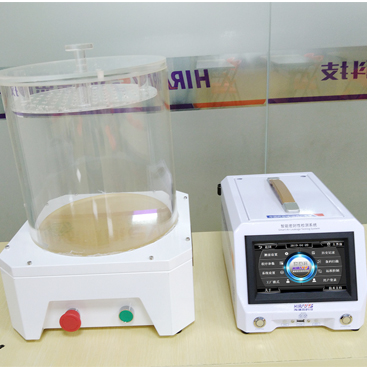
After the calibration is completed, put the mobile phone to be tested into the test chamber of the waterproof detector.Make sure the phone is placed firmly and will not move during the test.Usually, the test chamber of the Haris waterproof detector is transparent, so you can clearly see the test process.If the test chamber space is large, it is recommended to use a bracket or fixed clamp to maintain the stability of the mobile phone.
4. Select test mode
Hirays waterproof detectors usually provide a variety of test modes, such as simulated rain, immersion, scouring, etc.You can choose the appropriate test mode according to your needs.Generally, we recommend choosing the immersion mode to test the overall waterproof performance of your phone.After selecting the test mode, set it up according to the device operation guide to ensure that all parameters meet the waterproof standards of the mobile phone manufacturer.
5. Start detection
After everything is ready, the test can be officially started.Press the start button, and the Hirays waterproof detector will automatically start working.During the detection process, try to avoid external interference and do not move the equipment or change the set parameters at will.The entire testing process may take anywhere from a few minutes to dozens of minutes, so be patient and wait for the testing to complete.During this period, you can monitor the detection progress in real time through the device display.
6. Result analysis
After the test is completed, the Hirays waterproof detector will automatically generate a test report and display it on the screen.You can judge whether the waterproof performance of the mobile phone meets expectations based on various data in the report.Usually, the inspection report will include key indicators such as water pressure, soaking time, and leakage points.If the test result shows that the waterproof performance of the mobile phone is good, you can use it with confidence; if it is not qualified, it is recommended that you further search for the problem or contact the mobile phone manufacturer for a solution.
7. Cleaning and maintenance
After the test, remember to clean the test equipment in time.Drain the water from the test chamber and wipe it clean with a soft cloth.Regular maintenance and upkeep of equipment can extend its service life.Especially after multiple inspections, some small impurities or residues may affect the accuracy of the equipment. Be sure to keep the equipment clean and dry.
8. Record Keeping
In order to better track the waterproof performance of the mobile phone, it is recommended to record and save the test report after each test.In this way, once a waterproof performance problem occurs, you can have a well-documented record to facilitate analysis and improvement.Hirays waterproof detectors usually have a data storage function, and you can choose to save it directly to the device memory or export it to your computer.
